
Lunatic Pump Fast - Manual
User Manual
Instant win: drag Lunatic Pump Fast on to your bass, your track now pumps!
Quick-start Guide
Add Pump Fast to the effect rack of the track you want to duck the volume of, usually the bass. If you like the sound of that result, you're done! Otherwise, you can tweak the effect for more detailed shaping:
- Adjust the
durationof the ducking to change the volume curve as desired - Adjust the
offsetfrom the beat, to duck a bit earlier or later - Adjust the the beat
sync(the interval at which the volume curve is applied automatically) - Adjust the strength of the ducking (
D/W(dry/wet) of Pump Fast's effect)
Introduction: ducking
Pump Fast produces the signature pumping, or "sidechained" effect used in modern EDM music. This is done by a technique called ducking. Without ducking, the kick and the bassline would play at the same time, causing the sounds to be muddled. We solve this by ducking the bass when the kick drum hits, so the volume of the bass is lowered while the kick drum hits. This allows the kick to punch through with no bass in the way, maximizing the impact of both instruments.
Traditionally, this ducking is done using a compressor with a sidechain input, that's why the effect is sometimes referred to as "sidechaining". However, this can be time consuming to set up, you often need to tweak the compressor's controls quite a bit, and you may not be able to achieve the exact placement and shape of the volume envelope that Pump Fast can give you.
That's why many professional producers nowadays use volume automation, like Pump Fast. It simplifies your workflow and gives you more control over the ducking duration, placement, and shape. Add Pump Fast to your bass, and it modifies the gain of your bass, no need to carefully filter and sidechain in another track to a compressor. Every beat, it automatically applies your chosen volume curve to your track, precisely.
The controls and the envelope
Pump Fast includes the following controls:
- Duration: the duration of the ducking, how long the gain takes to recover
- Offset: how much the envelope is shifted off the beat, up to one beat either direction
- Sync: the length of a beat, the length of the envelope to be repeated
- D/W: the dry/wet mix of the ducking effect
- Bypass: turn Pump Fast on/off
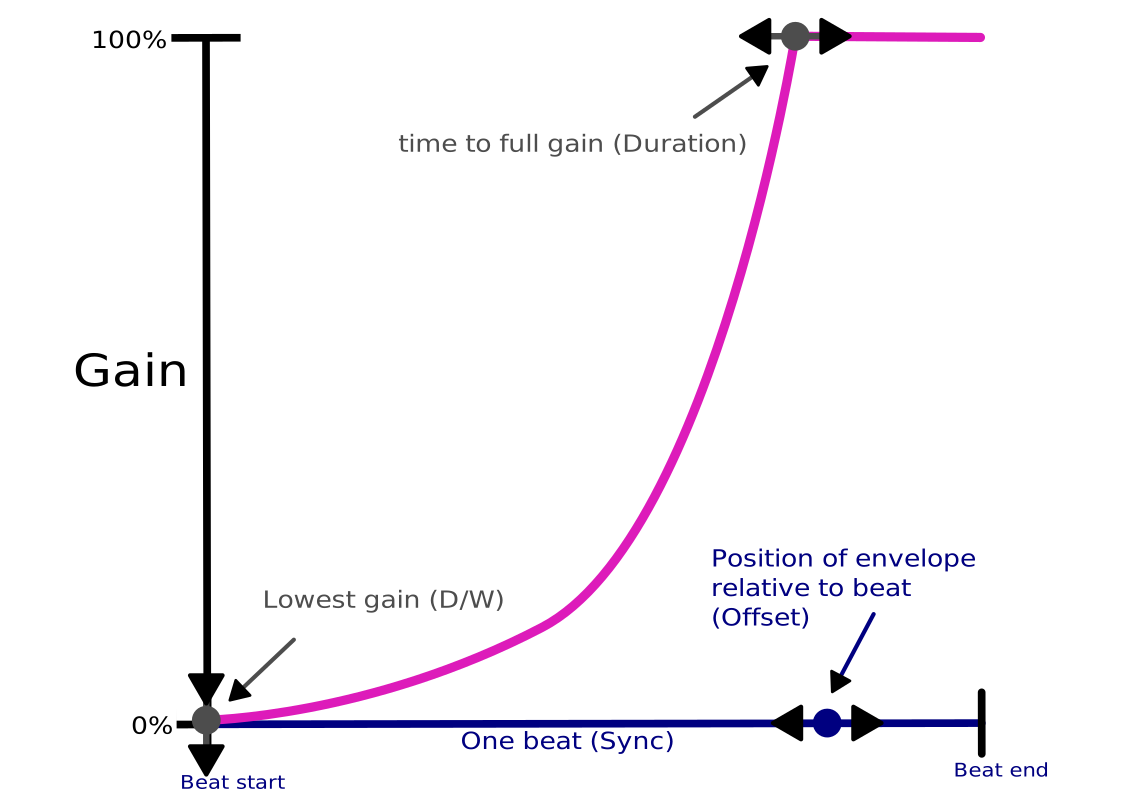
Pump Fast is an effect plugin, it applies the effect of adjusting your track's gain (the amplification of an audio signal). How Pump Fast changes the gain of the track you apply it to is described by an envelope.
Using the knobs and the slider in Pump Fast, you can specify various aspects of the envelope.
All controls can be reset to their default values by double-clicking on them.
Control the offset amount by clicking on the desired offset value, or dragging the slider to the desired position.
All other controls can be adjusted by left-clicking then dragging up or down to adjust up or down.
Pump Fast smooths its gain changes, and will not add clicks no matter how aggressively you change the controls.
1. Duration
The Duration knob controls the percentage of time in a beat Pump Fast ducks. The default for this is 0.5. At the lowest setting (0), Pump Fast does not change the gain. At the highest setting (1), Pump Fast ducks for the duration of the whole beat, never quite reaching full gain.
2. Offset
The Offset slider adjusts the timing of the envelope relative to the beat. The default for this is 0 offset, beginning the duck exactly on each beat. You can go up to 1 beat early or late. This allows you to have a lot of rhythmic possibilities!
- starting the ducking slightly before the beat, which strongly emphasizes your kick
- ducking only off-beats; with a sync of 1/2 and an offset of 0.5, every second quarter note will be ducked
- using multiple instances to duck complex rhythms
3. Sync
The Sync control lets you choose the note length that determines the envelope length. There are 9 options: 4/1, 2/1, 1/1, 1/2, 1/4, 1/8, 1/16, 1/32, 1/64th note. The default for this is 1/4 note, the most common beat length. To change this click the control and drag upward or downward until the display shows the desired note length.
4. D/W
The D/W knob controls the dry/wet amount of this effect. The default for this is 100%. At 50%, the lowest gain is 50%. At 0%, Pump Fast has no effect on its input. A similar control can usually be found in your DAW as well. This knob and your DAW's mix knob both apply to Pump Fast, sequentially.
5. Bypass
The Bypass button turns off the effect of Pump Fast. Click to turn on/off, it won't introduce clicks to the sound. Depending on your DAW, this button may be synced with your DAW's bypass button.
Automation
Pump Fast is designed so every control can easily make use of your DAW's automation, so you can control the envelope over the duration of your song.
See your DAW's documentation for details.
Resizing
Move your cursor to the bottom right hand corner of the plugin, when the cursor change to the shape with arrows on both ends, you can click and drag to resize the plugin.